
DM First Bank Withdrawal 2026: How to Add Bank and Withdraw
Last updated: 27 September 2026 | Reading time: 7 minutes
UPI is the fastest way to withdraw from DM First. But sometimes you want the money in your bank. Bigger amounts. Bank statement proof. Or you just prefer the traditional route.
DM First supports direct bank withdrawals. You need to add your bank details first. Then you can withdraw to it any time.
Here is exactly how to do it.
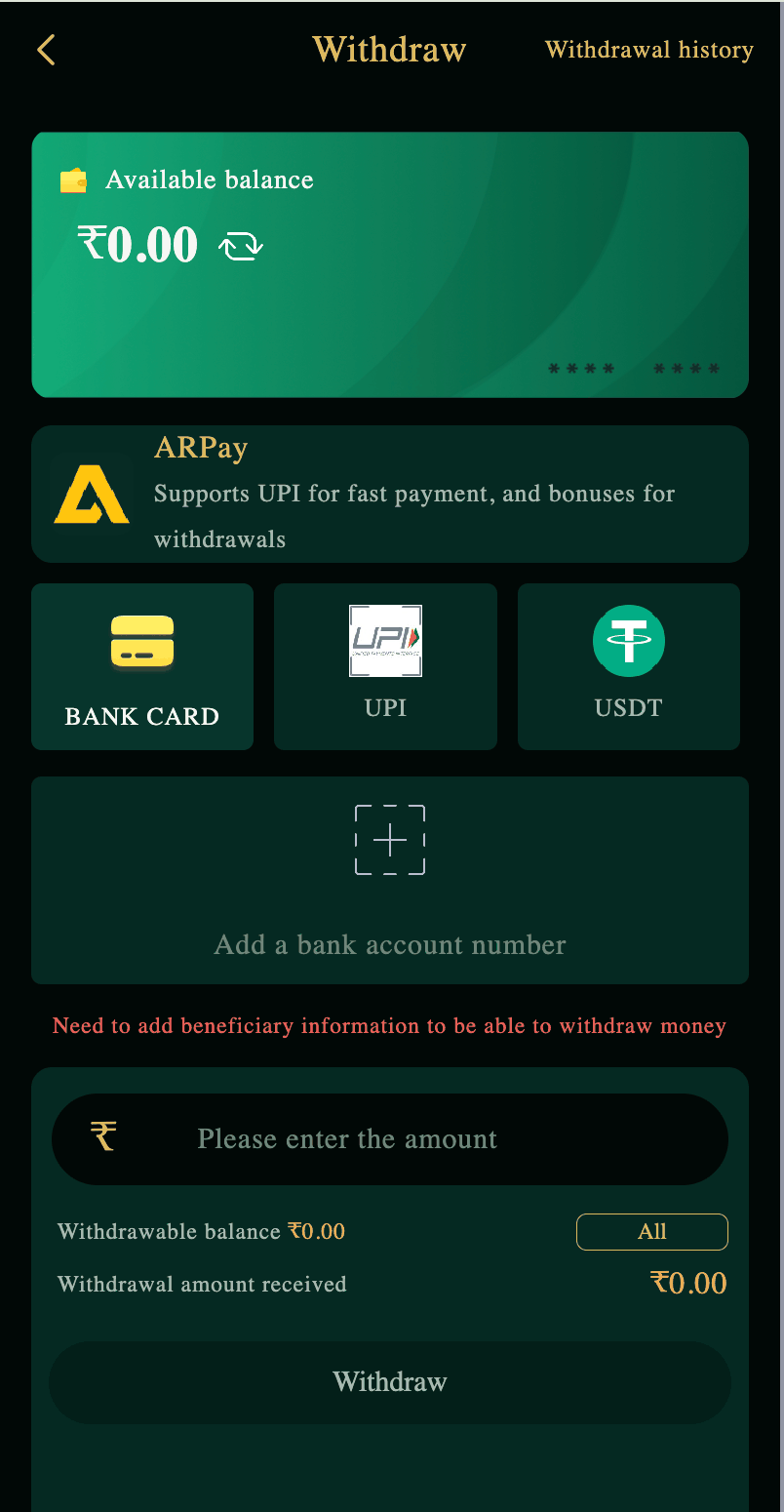
Bank Withdrawal vs UPI Withdrawal
| Feature | Bank Card | UPI |
|---|---|---|
| Speed | Few hours | 5-15 minutes |
| Minimum | ₹110 | ₹110 |
| Best For | Large amounts, bank proof | Quick withdrawals |
| Fees | None | None |
| Setup Required | Bank details first | UPI ID first |
UPI is faster. Bank Card is better for large amounts. Both have no fees.
How to Add Your Bank Account on DM First
Step 1: Open Withdraw Section
Open the DM First app. Tap the Account tab. Find the Withdraw option. Tap it.
Step 2: Choose Bank Card
You will see options — Bank Card, UPI, USDT. Tap Bank Card.
Step 3: Add Bank Details
You will be asked for:
Account Holder Name. Must match your DM First registered name.
Bank Account Number. Your savings or current account number.
Confirm Account Number. Retype it to avoid mistakes.
IFSC Code. The 11-character bank code. Found on your cheque or passbook.
Bank Name. Auto-fills based on IFSC. Or you select from a list.
Step 4: Save Beneficiary
Double-check all details. One wrong digit means the withdrawal fails. Tap Save.
Once saved, you do not need to add these details again. Future withdrawals use the same bank.
Step 5: Withdraw
Enter the amount you want to withdraw. Minimum ₹110. Tap Withdraw. The request is submitted.
Money arrives in your bank account in a few hours. Sometimes up to 24 hours depending on your bank.
New to DM First?
Register with invite code 94955187072 and get ₹120+ welcome bonus. Add your bank after your first win.
Register with Invite CodeBank Withdrawal Rules
| Rule | Details |
|---|---|
| Minimum withdrawal | ₹110 |
| Maximum per transaction | ₹10,000,000 |
| Withdrawals per day | Up to 3 |
| Withdrawal window | 00:00 to 23:55 |
| Processing time | A few hours to 24 hours |
| Fee | None |
Which IFSC Code Is Correct?
The IFSC code is 11 characters. Format: 4 letters (bank code) + 0 + 6 characters (branch code).
Example: HDFC0001234
Where to find your IFSC code:
Cheque book — printed on the front page.
Bank passbook — usually on the first page.
Your bank's net banking — in account details.
Google — search "IFSC code + your bank + your branch."
Do not guess the IFSC. One wrong character = failed withdrawal.
Common Bank Withdrawal Problems
Problem 1: Withdrawal Failed
Wrong IFSC or account number. The money is refunded to your DM First wallet. Fix the details and try again.
Problem 2: Withdrawal Stuck on Pending
Bank processing delay. Wait 24 hours. If still pending, contact support. Read our DM First withdrawal pending page.
Problem 3: Money Not Received
Check your bank statement. Sometimes the app does not update but the money has arrived. If the money is truly missing after 24 hours, contact support.
Problem 4: Name Mismatch
Account holder name on your bank account must match your DM First account name. If they differ, the withdrawal fails.
Bank Withdrawal Tips
Use a savings account, not a current account. Some banks block gambling-related transactions in current accounts.
Complete KYC first. Large bank withdrawals require KYC verification. Do it early. Read our DM First KYC process page.
Withdraw during the day. Bank processing is faster during business hours.
Do not withdraw small amounts. Bank transfers take a few hours. If you only need ₹200, use UPI instead.
Keep one bank account. Do not change bank details frequently. It triggers security reviews.
Frequently Asked Questions
1. How do I add bank on DM First?
Open Account. Tap Withdraw. Choose Bank Card. Enter name, account number, and IFSC. Save.
2. How long does bank withdrawal take?
A few hours. Sometimes up to 24 hours depending on your bank.
3. Minimum bank withdrawal?
₹110. Same as UPI.
4. Can I use someone else's bank account?
No. Account name must match your DM First name.
5. What if I entered wrong bank details?
Contact support immediately. Read our DM First customer support page.
6. Is there a fee?
No. Bank withdrawals are free.
7. Which is faster — bank or UPI?
UPI. 5-15 minutes vs a few hours for bank.
8. Can I have multiple bank accounts added?
No. One bank account per DM First account.
Final Words
Bank withdrawal on DM First is simple. Add your bank details once. Then withdraw anytime. No fees. No hassle.
Use UPI for small quick withdrawals. Use Bank Card for large amounts or when you need bank statement proof.
Double-check your account number and IFSC before saving. One wrong character causes a failed withdrawal.
That is it. Now you can move money from DM First to your bank whenever you want.
Withdraw to Your Bank
Register with code 94955187072 and start earning. Withdraw to UPI or bank.
Register with Invite Code