
DM First UPI Deposit 2026: Fastest Way to Add Money
Last updated: 27 September 2026 | Reading time: 7 minutes
UPI is the fastest way to add money to DM First. Scan a QR code, complete the payment, and the balance updates in seconds. No fees. No delays. No middlemen.
If you have never deposited via UPI on DM First, this page walks you through the exact process. And covers everything that could go wrong.
Why UPI Is the Best Deposit Method
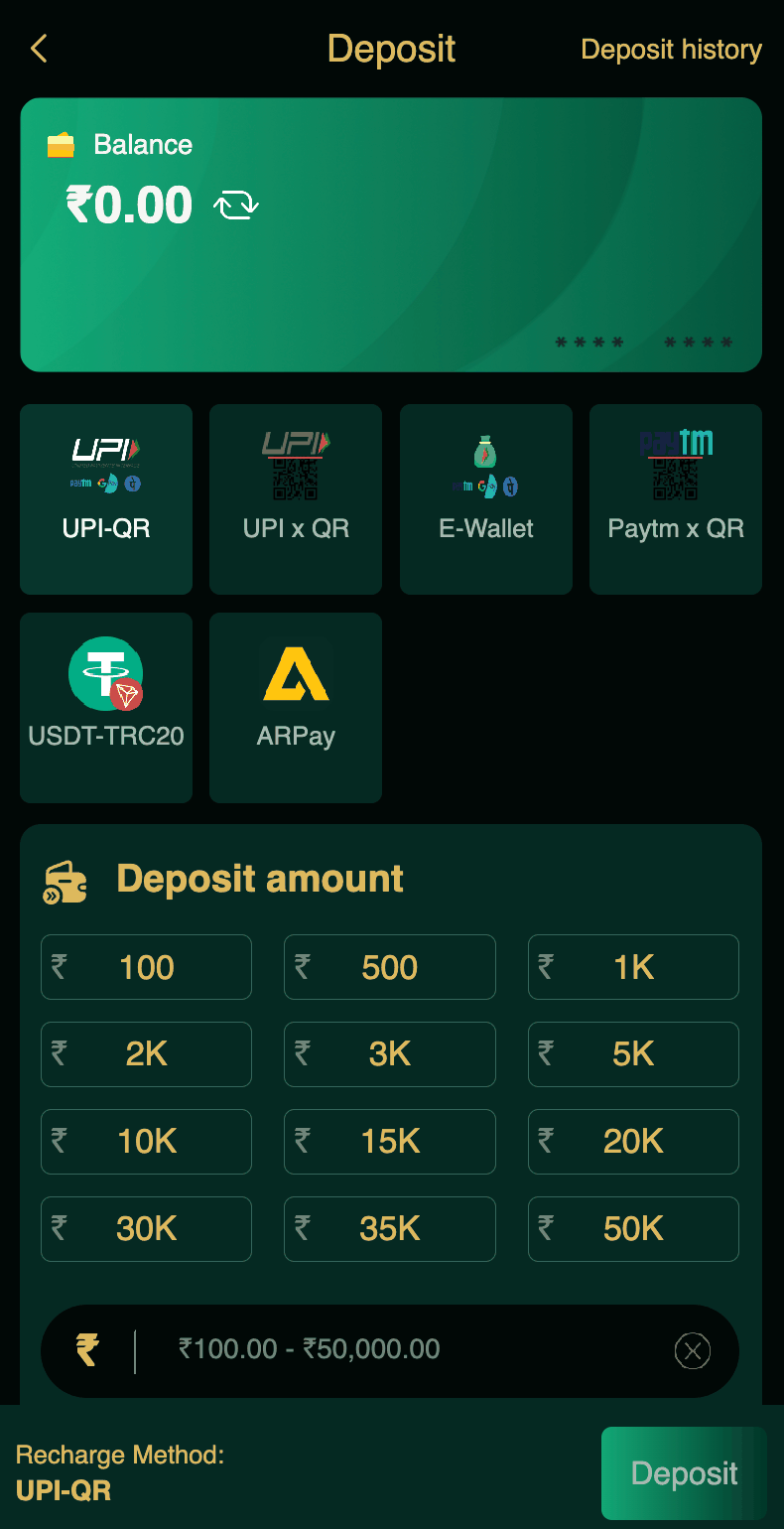
DM First has six deposit methods. UPI-QR, UPI x QR, E-Wallet, Paytm x QR, USDT-TRC20, and ARPay.
UPI is the best for three reasons.
Speed. Money credits to your wallet in seconds. Some other methods take a few minutes.
Familiarity. Everyone uses UPI. PhonePe, Google Pay, Paytm, BHIM — all work. No learning curve.
No fees. UPI deposit is free. No hidden charges.
The only downside is the ₹50,000 per transaction limit. If you want to deposit more in one go, you need USDT or multiple transactions.
How to Deposit via UPI on DM First
Step 1: Open Deposit Section
Open the DM First app. Tap the Account tab at the bottom. Find the Deposit option. Tap it.
Step 2: Select UPI-QR
You will see multiple methods. Tap UPI-QR. This is the fastest one.
Step 3: Enter Amount
Type the amount you want to deposit. Minimum ₹100. Maximum ₹50,000. There are also quick-select buttons — ₹100, ₹500, ₹1K, ₹2K, ₹5K, ₹10K.
Step 4: Scan the QR Code
The app shows a QR code. Open PhonePe, Google Pay, Paytm, or any UPI app. Tap the Scan option. Point your camera at the DM First QR code.
Step 5: Confirm the Amount
Your UPI app shows the amount and the recipient. Confirm that the amount matches exactly what you entered on DM First. If it does, proceed.
If the amount does not match, cancel and try again.
Step 6: Complete the Payment
Enter your UPI PIN. The payment processes. You will see a success message in your UPI app.
Return to DM First. Your wallet balance will update within seconds.
New to DM First?
Register with invite code 94955187072 and get ₹120+ welcome bonus. Then use UPI to add money fast.
Register with Invite CodeUPI-QR vs UPI x QR — What's the Difference?
| Feature | UPI-QR | UPI x QR |
|---|---|---|
| Process | Scan QR, pay | Scan QR with extra verification |
| Speed | Instant | Instant |
| Success Rate | High | Very High |
| Best For | Most deposits | When UPI-QR fails |
Both methods work the same way. UPI x QR has an extra verification step that makes it slightly more reliable when the standard method has issues. Use UPI-QR for regular deposits and UPI x QR when UPI-QR fails.
UPI Deposit Rules You Must Follow
Match the amount exactly. If DM First says ₹500, send ₹500. Not ₹499 or ₹501.
Complete the payment within the timer. Most deposit forms expire in 5-15 minutes. If you miss the window, start fresh.
Use only the QR shown in the app. Never use a QR from a screenshot or from someone who shared it on WhatsApp.
Deposit from your own bank account. Do not deposit from a friend's UPI or a family member's account. DM First requires the name to match.
Keep the transaction ID. Screenshot the success screen. You will need it if the deposit does not credit.
Common UPI Deposit Problems
Problem 1: Deposit Not Credited
Wait 15 minutes. Refresh the app. If still not credited, contact support with the transaction ID. Read our DM First deposit not credited page.
Problem 2: Amount Mismatch
You sent a different amount than what the app asked. This causes the deposit to fail. The money is refunded within 24 hours.
Problem 3: UPI App Shows Error
Try a different UPI app. If PhonePe fails, use Google Pay or Paytm. Sometimes one app has an issue while others work fine.
Problem 4: Payment Window Expired
Start a new deposit form. The old one is invalid.
UPI Deposit Limits
| Limit Type | Amount |
|---|---|
| Minimum deposit | ₹100 |
| Maximum per transaction | ₹50,000 |
| Daily limit | Depends on bank UPI limit |
| Deposit fee | None |
Tips for Faster UPI Deposits
Use UPI-QR instead of UPI x QR. It is slightly faster.
Use a stable internet connection. Weak signal causes delays.
Save the DM First UPI ID (after the first deposit) for faster payments.
Complete payment within 2-3 minutes of opening the deposit form.
Keep your UPI PIN memorized. Do not go hunting for it during the timer.
Frequently Asked Questions
1. How do I deposit via UPI on DM First?
Open app. Tap Deposit. Choose UPI-QR. Enter amount. Scan QR. Confirm payment.
2. What is the minimum UPI deposit?
₹100.
3. Are there UPI deposit fees?
No. Completely free.
4. How long does UPI deposit take?
Instant. Within seconds.
5. Which UPI app is best?
PhonePe, Google Pay, Paytm, BHIM — all work the same.
6. Why did my UPI deposit fail?
Amount mismatch, expired form, or UPI app issue. Read our DM First deposit not credited page.
7. Can I use someone else's UPI?
No. Deposit only from your own bank account.
8. What is the maximum UPI deposit?
₹50,000 per transaction.
Final Words
UPI is the fastest, easiest, and cheapest way to add money to DM First. Open the app, tap Deposit, scan the QR, complete the payment. Done in 30 seconds.
Match the amount exactly. Complete the payment quickly. Keep the transaction ID. If something goes wrong, contact support with the details.
That is it. Now you can deposit with confidence every time.
Deposit Fast, Play Fast
Register with code 94955187072 and use UPI for instant deposits.
Register with Invite Code