
DM First USDT Guide 2026: How to Deposit and Withdraw with Crypto
Last updated: 27 September 2026 | Reading time: 8 minutes
Most DM First players use UPI. It is simple and fast. But there is another option: USDT.
USDT is a cryptocurrency that stays pegged to the US dollar. One USDT equals one dollar. It does not fluctuate. So you get the benefits of crypto without the volatility.
If you already use crypto, USDT is a great option for DM First. If you are new to crypto, this page will explain everything.
Why Use USDT on DM First
Three reasons why some players prefer USDT over UPI.
No UPI limits. UPI has a ₹50,000 per transaction limit. USDT does not. You can deposit or withdraw much larger amounts.
No bank involvement. The money never touches your bank account. It goes from your crypto wallet directly to DM First. This is useful if your bank has restrictions.
Privacy. Bank transactions are recorded. Crypto transactions are on the blockchain but not linked to your bank account.
What You Need Before Using USDT
A crypto wallet that supports USDT-TRC20. Options: Trust Wallet, Binance, MetaMask (with Tron), Coinbase Wallet, or any other non-custodial wallet.
USDT in your wallet. You can buy USDT on exchanges like Binance, WazirX, CoinDCX, or CoinSwitch. Transfer it to your wallet.
Or you can use a centralised exchange wallet directly. Both work.
Important: Your wallet must support the TRC20 network. Not ERC20. Not BEP20. TRC20 only.
How to Deposit USDT on DM First
Step 1: Open Deposit Section
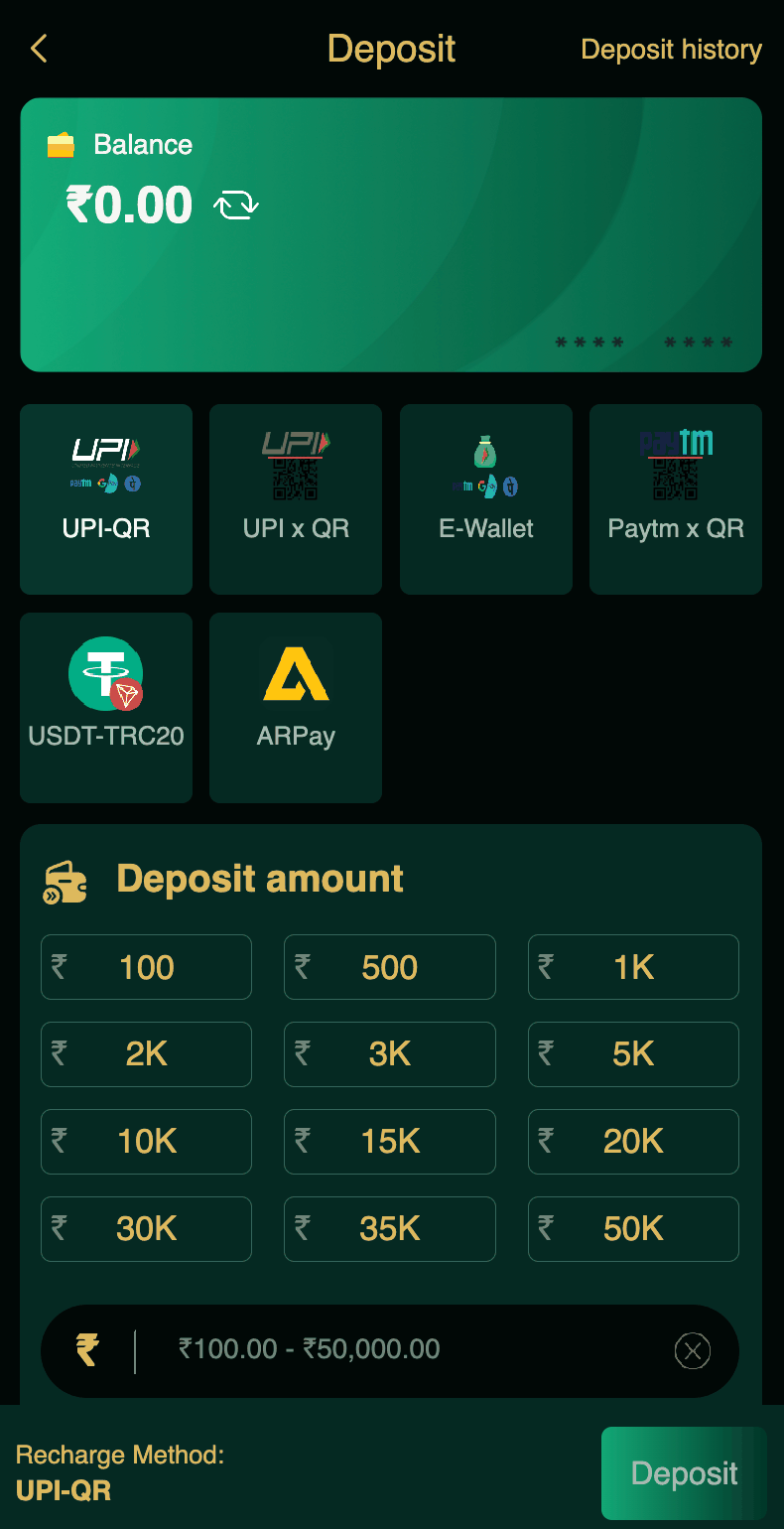
Open the DM First app. Tap Account. Tap Deposit.
Step 2: Choose USDT-TRC20
From the deposit methods, tap USDT-TRC20.
Step 3: Enter Amount
Enter the rupee amount you want to deposit. DM First shows the equivalent USDT amount based on the current rate. For example, ₹1,000 might be about 12 USDT.
Step 4: Copy the Wallet Address
DM First displays a USDT wallet address. This is where you need to send the funds. Tap to copy it.
Step 5: Send USDT from Your Wallet
Open your crypto wallet or exchange. Choose "Send". Paste the DM First wallet address. Enter the exact USDT amount shown.
Verify the network is TRC20. Not ERC20. Not BEP20. If you select the wrong network, the funds are lost permanently.
Step 6: Confirm and Wait
Complete the transaction. Your wallet shows a pending status. After 5-15 minutes, the blockchain confirms it. DM First credits your account automatically.
New to DM First?
Register with invite code 94955187072 and get ₹120+ welcome bonus. Use UPI first if you are new to crypto.
Register with Invite CodeHow to Withdraw USDT from DM First
Step 1: Open Withdraw Section
Tap Account. Tap Withdraw.
Step 2: Choose USDT
From the withdrawal methods, tap USDT.
Step 3: Add Your Wallet Address
Enter your USDT-TRC20 wallet address. Double-check every character. One wrong character means the funds go nowhere.
If this is your first time, save the address as a beneficiary.
Step 4: Enter Amount
Enter the amount in rupees. DM First converts it to USDT. Minimum is ₹1,030 for USDT withdrawals (higher than UPI).
Step 5: Confirm
Verify the wallet address again. Then confirm. The withdrawal processes in 5-15 minutes plus blockchain confirmation.
USDT-TRC20 vs Other Networks
| Network | DM First Support | Notes |
|---|---|---|
| TRC20 (Tron) | Yes ✅ | Low fees, fast confirmation |
| ERC20 (Ethereum) | No ❌ | Higher fees |
| BEP20 (Binance) | No ❌ | Different network |
Only use TRC20. If you send USDT on the wrong network, the money cannot be recovered. This is a blockchain rule, not a DM First limitation.
USDT Deposit vs UPI Deposit
| Feature | USDT-TRC20 | UPI |
|---|---|---|
| Speed | 5-15 minutes | Instant |
| Fees | Blockchain gas fee ($1-3) | None |
| Limits | Very high | ₹50,000 per transaction |
| Privacy | High | Standard |
| Beginner Friendly | Medium | Easy |
If you are new to crypto, stick with UPI. Use USDT only after you understand how blockchain transfers work.
Common USDT Mistakes
Wrong network. Sending USDT on ERC20 when the recipient expects TRC20. Money lost permanently.
Wrong wallet address. One wrong character = funds go nowhere. Always copy-paste, never type manually.
Sending less than the exact amount. DM First expects the exact USDT amount shown. If you send less or more, the deposit fails.
Not waiting for blockchain confirmation. Do not refresh DM First repeatedly. Wait for the confirmation. Then the credit appears.
Using a wallet that does not support TRC20. Some wallets only support ERC20. Check before sending.
Frequently Asked Questions
1. What is USDT-TRC20?
USDT is a stablecoin pegged to the US dollar. TRC20 is the Tron network that DM First uses.
2. How long does USDT deposit take?
5 to 15 minutes for blockchain confirmation.
3. Minimum USDT deposit?
₹100 equivalent. Usually about 1.2 USDT.
4. Which network?
TRC20 only. Not ERC20 or BEP20.
5. Are there fees?
DM First charges no fees. Blockchain network charges a small gas fee.
6. What if I send on wrong network?
Funds are lost permanently. No way to recover.
7. Is USDT safe?
Yes. Blockchain transfers are secure. Just use the correct network and address.
8. Should beginners use USDT?
No. Start with UPI. Use USDT after you understand crypto.
Final Words
USDT is a solid option for DM First deposits and withdrawals. Faster than bank, higher limits than UPI, and no bank involvement.
But it requires crypto knowledge. If you are new to crypto, stick with UPI. Once you understand blockchain transfers, USDT becomes a powerful tool.
Always use TRC20. Always copy-paste the address. Always verify before confirming.
Do that, and USDT is one of the best payment options on DM First.
Try USDT or UPI
Register with code 94955187072 and choose the payment method that suits you.
Register with Invite Code