
DM First Account Settings 2026: How to Manage Your Profile
Last updated: 26 September 2026 | Reading time: 8 minutes
Most players never open the Settings menu on DM First. They sign up, they play, they withdraw, and that is it. But there are useful things hiding inside Account Settings. Password change. Language options. Notification preferences. Customer support access.
If you have not explored it yet, this page walks you through every option. So you know what is available when you need it.
Where to Find Settings
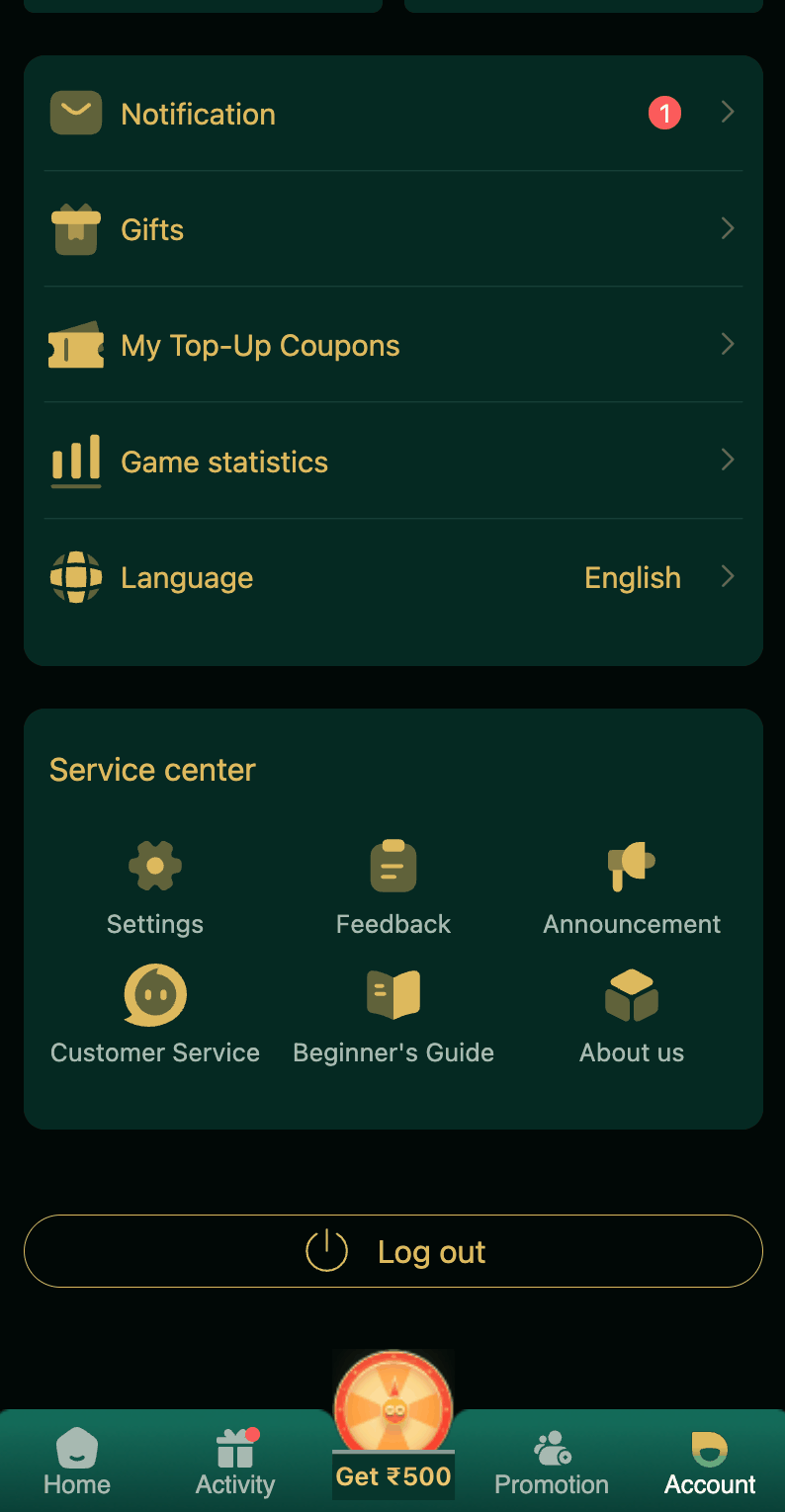
Open the DM First app. At the bottom of the screen, tap the Account tab. This opens your profile page. From here, all settings are accessible.
Your profile shows your UID, your total balance, and your VIP level. Below that, you will find options for deposit, withdraw, wallet, and settings.
Change Your Password
Tap Account. Then tap Settings. Find the Change Password option. Enter your old password. Then type your new password twice — once to set it, once to confirm.
Your new password must be at least 8 characters. It should include letters and numbers. A mix of capital and small letters is even better.
Once you change the password, you will be logged out from all devices. You need to login again with the new password on every device. This is a security feature, not a bug.
Change your password every 3 to 6 months. Or immediately if you suspect any breach. Read our DM First account security page for more.
Change Language
DM First supports multiple languages. English. Hindi. And a few other Indian languages depending on your app version.
To change: Tap Account. Tap Language. Select your preferred language from the list. The app will restart with the new language.
If you are more comfortable in Hindi, switch to Hindi. Every button, every message, every bonus screen will be in Hindi. It makes the experience much easier.
Notification Settings
Notifications are how DM First tells you about new bonuses, gift codes, and offers. If you turn them off, you miss out on free money.
To manage: Tap Account. Tap Settings. Tap Notifications. You will see options for:
Bonus Alerts. Notifies you when a new bonus is available.
Gift Codes. Alerts you the moment a new gift code drops.
Deposit/Withdrawal. Alerts for successful transactions.
Promotions. Alerts about new events and offers.
Turn on everything except Promotion if you want a clean notification feed. Turn on Promotion too if you want to catch every bonus opportunity.
New to DM First?
Register with invite code 94955187072 and get ₹120+ welcome bonus. Turn on notifications to catch every future bonus.
Register with Invite CodeFind Your UID
Your UID is a 6 to 8 digit number that identifies your account. You will need it when contacting support. Or when recovering your account.
To find it: Tap Account. The UID is shown right below your name. It usually starts with "UID" and then the number.
Write it down somewhere safe. Not just in the app. If the app locks you out, you still need this number. Read our DM First account recovery page.
View Your VIP Level
Tap Account. Tap VIP. You will see your current VIP level, your EXP, and what benefits you get.
VIP levels range from VIP0 to VIP6. Higher levels give you higher rebate rates, safe income, and level-up bonuses. Read our DM First VIP levels page for details.
Customer Support Access
Tap Account. Scroll down to Service Center. Tap Customer Service. A chat window opens where you can describe your problem. Attach screenshots if needed.
You can also join the official Telegram channel for support: DM First Telegram
Read our DM First customer support page for full details.
Other Settings You Might Need
Feedback. Send suggestions or report issues directly to the DM First team.
Announcements. Read official news about the platform, updates, and new features.
Beginner's Guide. Short in-app tutorials about how to play each game.
About Us. Information about DM First, terms, and privacy policy.
Log Out. Sign out of your account. Use this before handing your phone to someone else.
Log Out Safely
Logging out is more important than most players think. If you are using a shared phone, always log out when done. Otherwise the next person can access your wallet and play with your money.
To log out: Tap Account. Scroll to the bottom. Tap Log Out. Your session ends immediately.
Deleting Your Account
If you want to permanently delete your DM First account, contact support. There is no self-service option for account deletion.
Deleting the account removes all data: your balance, history, bonuses, VIP level, and referral network. Make sure you withdraw your balance first.
Note: deleting your account does not remove any bans. If you were banned for fraud or multiple accounts, creating a new account will also be blocked.
Frequently Asked Questions
1. How do I change my password?
Account > Settings > Change Password. Enter old password, then new password twice.
2. How do I change language?
Account > Language. Choose English, Hindi, or another option.
3. How do I enable notifications?
Account > Settings > Notifications. Turn on bonuses, gift codes, and promotions.
4. Where do I find my UID?
Account section. It is shown below your name.
5. Can I delete my account?
Yes. Contact support. Withdraw your balance first.
6. Where is customer support?
Account > Service Center > Customer Service. Or the Telegram channel.
7. How often should I change the password?
Every 3 to 6 months. Or immediately after any suspicious activity.
8. Does changing password log me out?
Yes. From all devices. Login again with the new password. Read our DM First login page.
Last Words
Account Settings is where you manage everything about your DM First account. You do not need to visit it often. But knowing what is there helps when you need it.
Change your password every few months. Keep notifications on. Note down your UID. Know where customer support is.
That way, when something goes wrong, you can fix it fast.
Set Up Your Account Properly
Register with code 94955187072 and configure your settings from day one.
Register with Invite Code