
DM First Login Problem 2026: 10 Fixes That Actually Work
Last updated: 27 September 2026 | Reading time: 9 minutes
You tap Login. You type your password. It says wrong password. Or the OTP never arrives. Or the app just freezes on the loading screen.
Login problems are the most annoying thing on any gaming app. Because you cannot do anything until you get in.
I have been through every DM First login issue myself. Let me walk you through all 10 fixes.
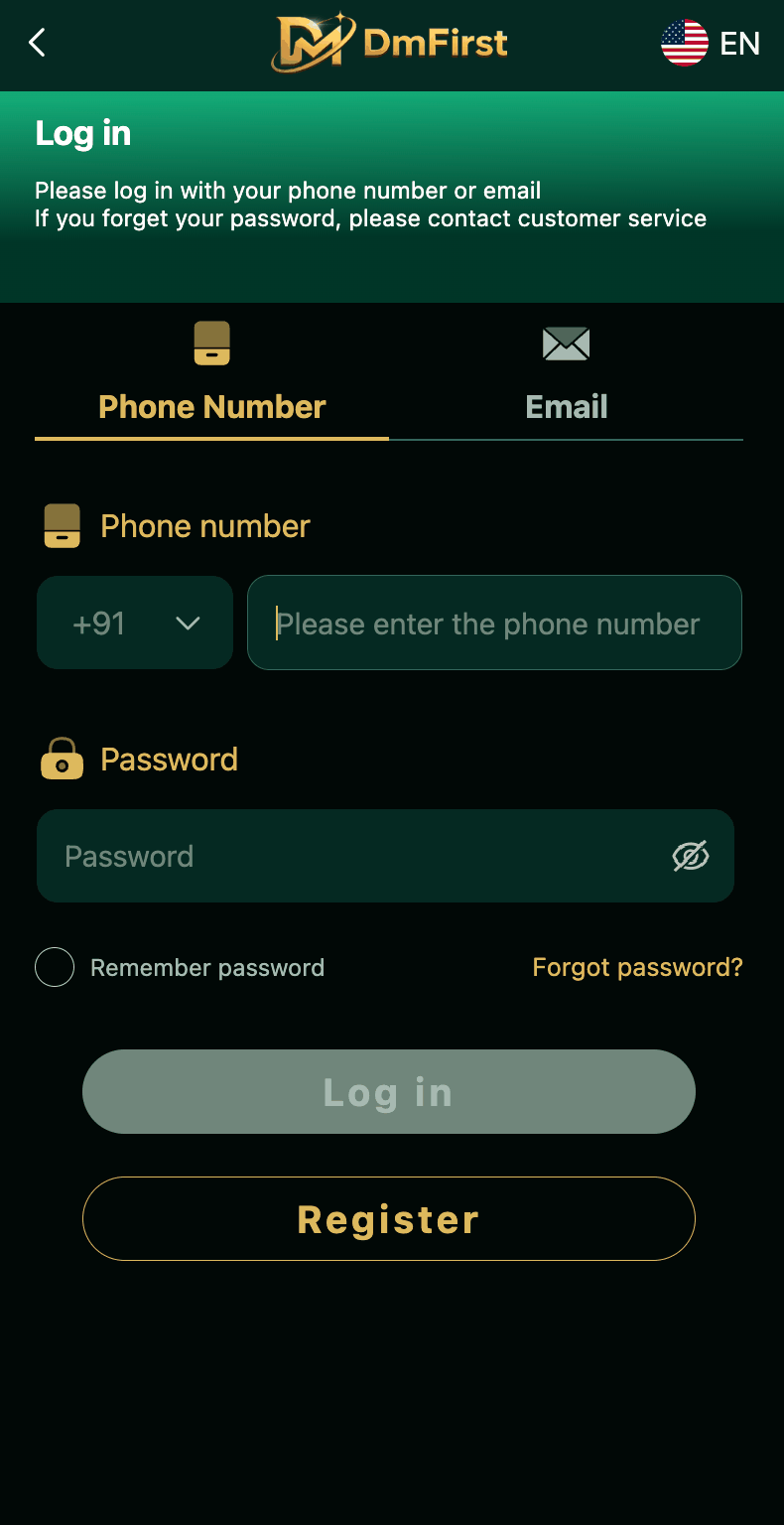
Fix 1: Wrong Password — Check Caps Lock and Eye Icon
This is the most common login problem. You type the password. It says wrong. You are 100% sure it is right.
But 9 times out of 10, it is a small typing mistake. Caps Lock is on. Or you typed a capital letter as small. Or a number is off by one.
Tap the eye icon in the password field. Now you can see what you actually typed. Check each character. Fix the mistake. Try again.
If the password still does not work, move to Fix 2.
Fix 2: Reset the Password
Do not waste time guessing. Reset it. Here is how.
On the login screen, tap "Forgot Password?" Enter your registered mobile number. You will receive a 6-digit OTP. Verify it. Now set a new password. At least 8 characters, with letters and numbers.
Confirm the password. Now login with the new one.
The reset takes 30 seconds. Faster than trying to remember the old password.
Read our DM First login page for the full process.
Fix 3: OTP Not Arriving — Check These 5 Things
You tapped Send OTP. Ten minutes passed. Nothing.
Here is what to check.
Is your SMS inbox full? Clear some messages. Delete old OTPs. Make room for new ones.
Is your phone signal weak? Move to an area with better coverage. Or connect to WiFi and use a different OTP method if available.
Are you in DND mode? Do Not Disturb blocks transactional SMS sometimes. Turn it off. Try again.
Is the number correct? Check the last 2-3 digits. Typo happens. Fix and resend.
Do you have network issues? Restart the phone. Force close the app. Open it again and resend the OTP.
If none of these work, contact support with your UID. Read our DM First customer support page.
Fix 4: Account Not Found — Register First
You enter your phone number. It says "Account not found."
Two possibilities.
One, you typed the wrong number. Check again. Include the +91. Verify each digit.
Two, you never registered. Many people try to login before creating an account. DM First does not work like that. You must register first. Read our DM First register page.
Fix 5: Update the App
Older versions of the DM First app have bugs. Sometimes the login screen does not work properly. Sometimes the password field does not register input. Sometimes the OTP screen crashes.
Delete the app. Download the latest version from the official platform. Install it. Try again.
Read our DM First app download page for the latest version.
Fix 6: Clear App Cache
Sometimes the app has a cached login state. It thinks you are trying to use an old session. The server rejects it. The login loop begins.
Clear the app cache.
Go to Settings. Then Apps. Find DM First. Tap Storage. Tap Clear Cache. Now open the app and login fresh.
Do not tap Clear Data. That will erase your local settings. Only Clear Cache.
Fix 7: Check Internet Connection
The login process needs a stable connection. If your internet is weak, the request might time out.
Turn off WiFi. Turn on mobile data. Try again.
Or the opposite. Turn off mobile data. Connect to a fast WiFi. Try again.
You can also try airplane mode on for 10 seconds, then off. This resets the network on your phone.
Fix 8: Try Login with Email
If you registered with both phone and email, try the other option.
On the login screen, tap the Email tab. Enter your registered email. Type password. Try.
Sometimes the SMS system is down but the email login still works. This gets you in while you wait for SMS to recover.
Fix 9: Too Many Failed Attempts
If you tried to login 5+ times with the wrong password, the system may temporarily lock your account. This is a safety feature.
Wait 15 to 30 minutes. Try again. Or reset the password using Forgot Password — this bypasses the lock.
Fix 10: Wrong Website / Fake App
You might be trying to login on a fake website or fake APK. Scammers build DM First lookalikes to steal your login details.
Check the source. Is the website address the official one? Or does it look suspicious?
Is the app installed from the official platform? Or did you install it from a WhatsApp link or Telegram file?
If anything looks off, close it. Delete the fake app. Install from the official source. Read our DM First APK safety page.
New to DM First?
Register with invite code 94955187072 and get ₹120+ welcome bonus. Avoid every login problem by using the official app.
Register with Invite CodeLogin Problem Quick Reference
| Problem | Fix |
|---|---|
| Wrong password | Use eye icon, or reset |
| OTP not arriving | Check inbox, restart phone |
| Account not found | Register first |
| App crashes | Update app |
| Login loop | Clear cache |
| Slow loading | Check internet |
| Too many attempts | Wait 30 minutes |
| Fake site warning | Use official app |
How to Never Face Login Problems Again
Use a strong password you will not forget. Write it down somewhere safe if needed.
Keep the app updated. Set auto-update if available.
Do not use the same password on multiple apps. If one leaks, all are at risk.
Keep your registered phone number active. Do not let it expire.
Only download from the official platform. Never from WhatsApp or Telegram.
Read our DM First account security page for a full safety checklist.
Frequently Asked Questions
1. Why is my DM First login not working?
Wrong password, unregistered number, weak internet, or old app. Reset the password or update the app.
2. What if I forgot my password?
Tap Forgot Password. Enter phone number. Verify OTP. Set new password. Read our DM First login page.
3. Why am I not getting the OTP?
Wait 2-3 minutes. Check SMS inbox. Restart phone. Try again.
4. Can I login on multiple devices?
No. Only one active session at a time.
5. Why does it say account not found?
Wrong number or you have not registered yet. Read our DM First register page.
6. How do I clear app cache?
Settings > Apps > DM First > Storage > Clear Cache.
7. What if app keeps crashing?
Update the app. Read our DM First app download page.
8. Can I login with email instead of phone?
Yes, if you registered with email. Tap the Email tab on the login screen.
Final Words
DM First login problems are frustrating but fixable. Every issue on this page has a solution that works.
Start with the simplest fix. Wrong password? Check the eye icon. OTP not coming? Wait 2 minutes. Account not found? Register first.
Only after simple fixes fail, move to bigger ones. Clear cache. Update app. Contact support.
In 95% of cases, you are back in within 5 minutes.
Login Without Issues
Register with code 94955187072 and follow these tips to avoid login problems from day one.
Register with Invite Code